> ## Documentation Index
> Fetch the complete documentation index at: https://docs.infrastack.ai/llms.txt
> Use this file to discover all available pages before exploring further.

# Deploy your Next.js application with OpenTelemetry to Vercel via infrastack.ai

> Learn how to deploy your Next.js application with OpenTelemetry to Vercel via infrastack.ai

export const JsIcon = ({size = "24"}) => <svg xmlns="http://www.w3.org/2000/svg" viewBox="0 0 50 50" width={size} height={size} fill="#708090"><path d="M 43.335938 4 L 6.667969 4 C 5.195313 4 4 5.195313 4 6.667969 L 4 43.332031 C 4 44.804688 5.195313 46 6.667969 46 L 43.332031 46 C 44.804688 46 46 44.804688 46 43.335938 L 46 6.667969 C 46 5.195313 44.804688 4 43.335938 4 Z M 27 36.183594 C 27 40.179688 24.65625 42 21.234375 42 C 18.140625 42 15.910156 39.925781 15 38 L 18.144531 36.097656 C 18.75 37.171875 19.671875 38 21 38 C 22.269531 38 23 37.503906 23 35.574219 L 23 23 L 27 23 Z M 35.675781 42 C 32.132813 42 30.121094 40.214844 29 38 L 32 36 C 32.816406 37.335938 33.707031 38.613281 35.589844 38.613281 C 37.171875 38.613281 38 37.824219 38 36.730469 C 38 35.425781 37.140625 34.960938 35.402344 34.199219 L 34.449219 33.789063 C 31.695313 32.617188 29.863281 31.148438 29.863281 28.039063 C 29.863281 25.179688 32.046875 23 35.453125 23 C 37.878906 23 39.621094 23.84375 40.878906 26.054688 L 37.910156 27.964844 C 37.253906 26.789063 36.550781 26.328125 35.453125 26.328125 C 34.335938 26.328125 33.628906 27.039063 33.628906 27.964844 C 33.628906 29.109375 34.335938 29.570313 35.972656 30.28125 L 36.925781 30.691406 C 40.171875 32.078125 42 33.496094 42 36.683594 C 42 40.117188 39.300781 42 35.675781 42 Z" /></svg>;

export const GithubIcon = ({size = "24"}) => <svg xmlns="http://www.w3.org/2000/svg" viewBox="0 0 100 100" width={size} height={size} fill="#708090"><path fill-rule="evenodd" clip-rule="evenodd" d="M48.854 0C21.839 0 0 22 0 49.217c0 21.756 13.993 40.172 33.405 46.69 2.427.49 3.316-1.059 3.316-2.362 0-1.141-.08-5.052-.08-9.127-13.59 2.934-16.42-5.867-16.42-5.867-2.184-5.704-5.42-7.17-5.42-7.17-4.448-3.015.324-3.015.324-3.015 4.934.326 7.523 5.052 7.523 5.052 4.367 7.496 11.404 5.378 14.235 4.074.404-3.178 1.699-5.378 3.074-6.6-10.839-1.141-22.243-5.378-22.243-24.283 0-5.378 1.94-9.778 5.014-13.2-.485-1.222-2.184-6.275.486-13.038 0 0 4.125-1.304 13.426 5.052a46.97 46.97 0 0 1 12.214-1.63c4.125 0 8.33.571 12.213 1.63 9.302-6.356 13.427-5.052 13.427-5.052 2.67 6.763.97 11.816.485 13.038 3.155 3.422 5.015 7.822 5.015 13.2 0 18.905-11.404 23.06-22.324 24.283 1.78 1.548 3.316 4.481 3.316 9.126 0 6.6-.08 11.897-.08 13.526 0 1.304.89 2.853 3.316 2.364 19.412-6.52 33.405-24.935 33.405-46.691C97.707 22 75.788 0 48.854 0z" /></svg>;

#### What you will learn

* How to deploy your Next.js application with OpenTelemetry to [Vercel](https://vercel.com) with infrastack.ai

#### Prerequisites

* A Vercel account
* An infrastack.ai account
* A Next.js application configured with the infrastack.ai SDK, see [Integrate OpenTelemetry for Next.js with infrastack.ai](/documentation/integrate-opentelemetry-for-nextjs-with-infrastack)

<Info>
  The application should be on the `nodejs` runtime. The `edge` runtime is not supported at this time.
</Info>

<CardGroup cols={1}>
  <Card title="Follow the example project on GitHub" href="https://github.com/infrastackai/infrastack/tree/main/examples/nextjs" icon={<GithubIcon />} />
</CardGroup>

#### Overview

Vercel is a platform for deploying serverless applications. It supports a wide range of frameworks, including Next.js. With the power of infrastack.ai and OpenTelemetry, you can get comprehensive observability for your Next.js application on Vercel.

After you have configured your application with the infrastack.ai SDK by following the [Integrate OpenTelemetry for Next.js with infrastack.ai](/documentation/integrate-opentelemetry-for-nextjs-with-infrastack) guide, you can deploy your application to Vercel by following these steps:

<Steps>
  <Step title="Push your application code to a GitHub repository">
    * On your GitHub account, create a new repository or use an existing one. It can be private or public.
    * Push your application code to the repository.
    * If you need help setting up your repo, take a look at [this guide on GitHub](https://help.github.com/en/github/getting-started-with-github/create-a-repo).
  </Step>

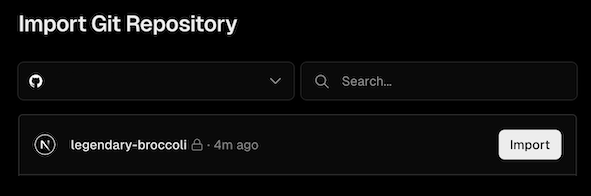
  <Step title="Create a new project on Vercel">
    * Go to the [Vercel dashboard](https://vercel.com/).
    * Click on the `New Project` button.
    * Select the `GitHub` option.
    * Follow the instructions to connect your GitHub account to Vercel.
    * Select the repository you created in the previous step.
    * Click on the `Deploy` button.
      <Tip>It will take a few minutes to deploy your application.</Tip>
          <img src="https://mintcdn.com/infrastack/twgoQ12rUABY4tXO/images/vercel-nextjs-step1.png?fit=max&auto=format&n=twgoQ12rUABY4tXO&q=85&s=984a6fd125b304be09b400efbb733cc3" alt="Vercel Git Connection" width="591" height="196" data-path="images/vercel-nextjs-step1.png" />
  </Step>

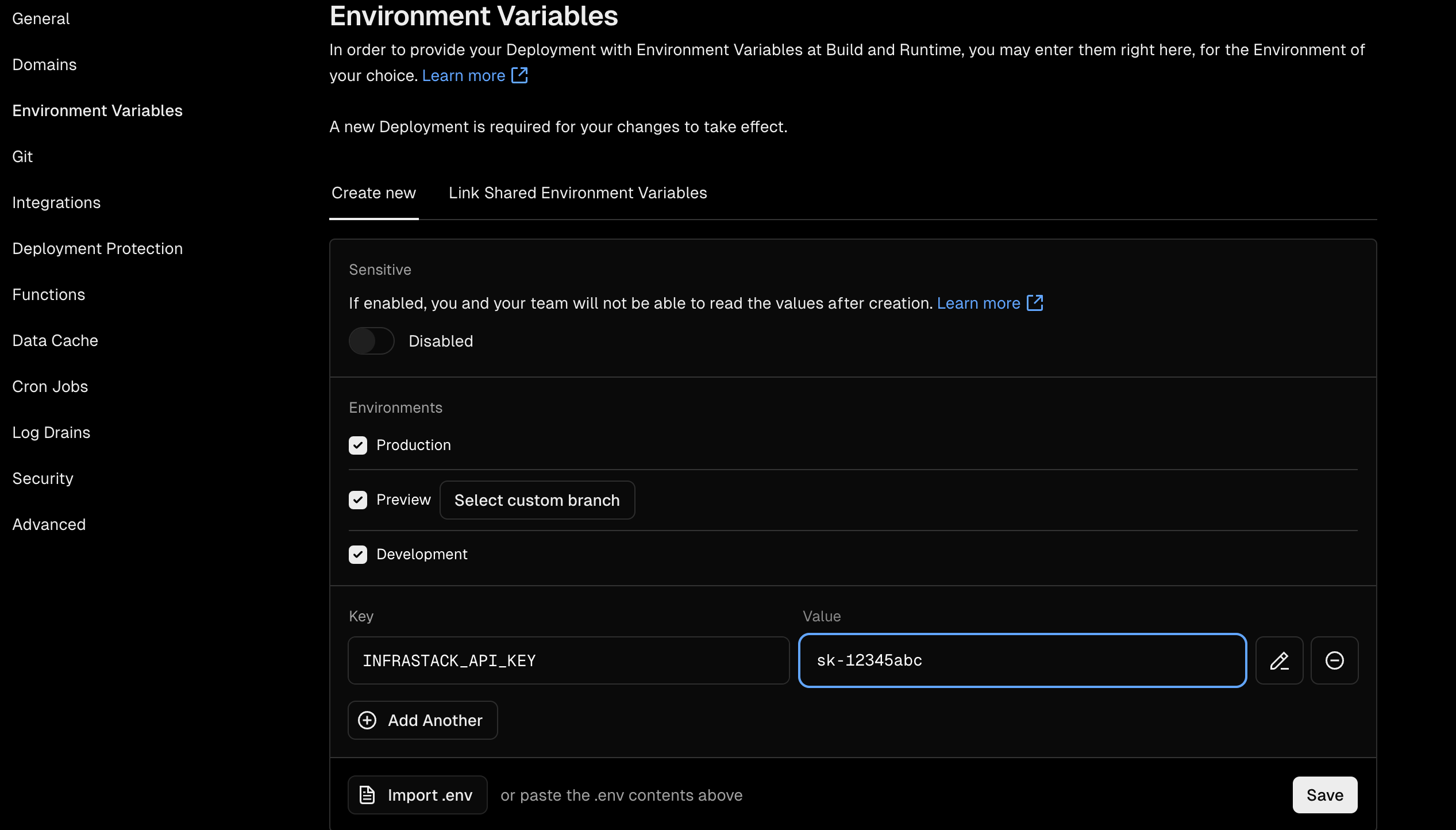
  <Step title="Configure your environment variables">
    * Go to the [Vercel dashboard](https://vercel.com/).
    * Select the project you created in the previous step.
    * Click on the `Settings` tab.
    * Click on the `Environment Variables` tab.
    * Add the following environment variable:
    * `INFRASTACK_API_KEY`: Your infrastack.ai API key.
          <img src="https://mintcdn.com/infrastack/twgoQ12rUABY4tXO/images/vercel-nextjs-step2.png?fit=max&auto=format&n=twgoQ12rUABY4tXO&q=85&s=804cea785fa74a10f063a679f0e0282d" alt="Vercel Environment Variables" width="2534" height="1444" data-path="images/vercel-nextjs-step2.png" />
  </Step>

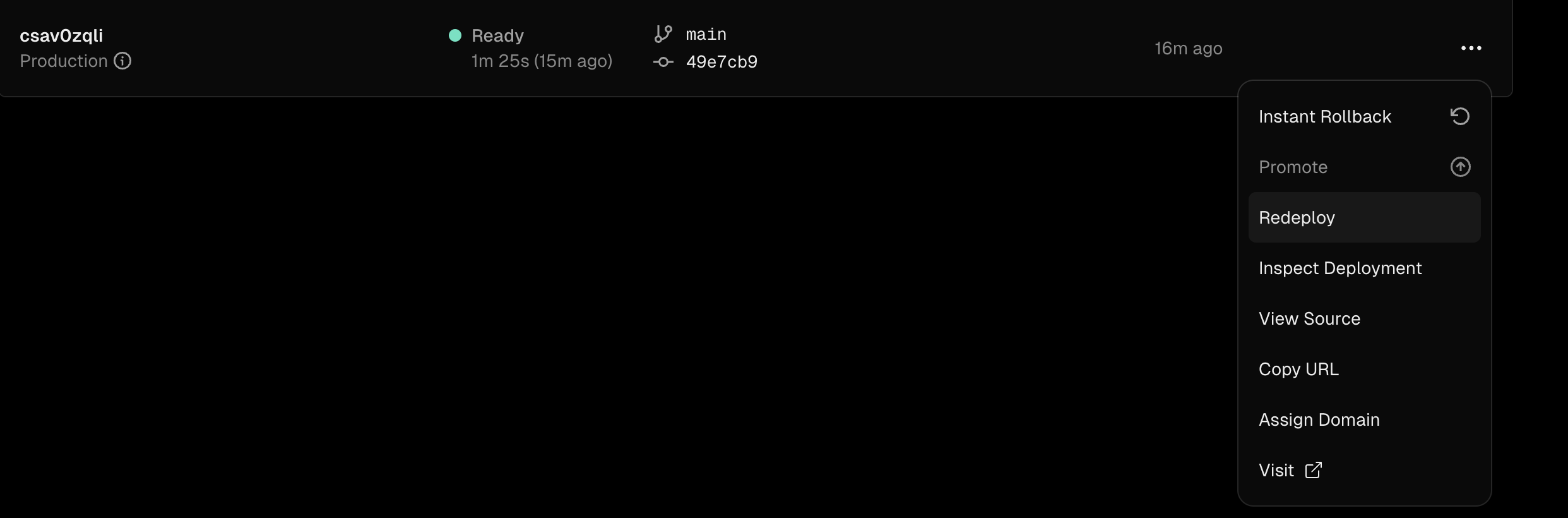
  <Step title="Redeploy your application">
    * Go to the [Vercel dashboard](https://vercel.com/).
    * Select the project you created in the previous step.
    * Click on the `Deployments` tab.
    * Find the deployment that was created automatically.
    * Click on the three dots on the right side of the deployment and select `Redeploy`.
          <img src="https://mintcdn.com/infrastack/twgoQ12rUABY4tXO/images/vercel-nextjs-step3.png?fit=max&auto=format&n=twgoQ12rUABY4tXO&q=85&s=47475879cfd9773ecc666afa9013c867" alt="Vercel Redeploy" width="2484" height="820" data-path="images/vercel-nextjs-step3.png" />
  </Step>

  <Step title="Visit your application">
    You can visit your application by clicking on the `Visit` button.
  </Step>
</Steps>

<Tip>Now, you can check your data in the [infrastack.ai](https://app.infrastack.ai) dashboard.</Tip>

<CardGroup cols={2}>
  <Card title="Javascript SDK Reference" href="/sdk-reference/javascript/configuration" icon={<JsIcon />} />

  <Card title="Explore the Next.js example project" href="https://github.com/infrastackai/infrastack/tree/main/examples/nextjs" icon={<GithubIcon />} />
</CardGroup>